iBeacon & Eddystone Scanner1.0.1
Publisher Description
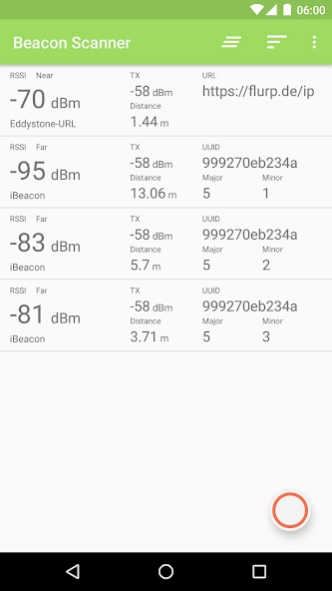
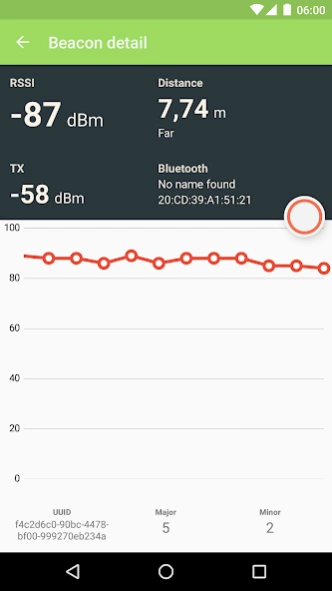
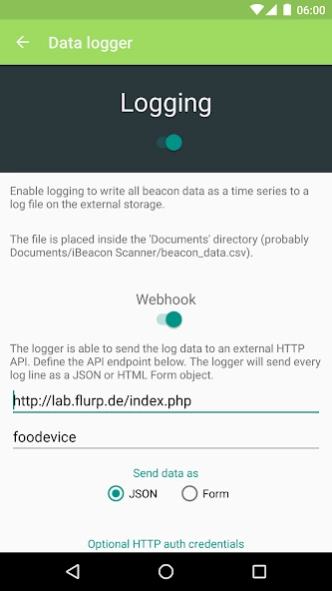
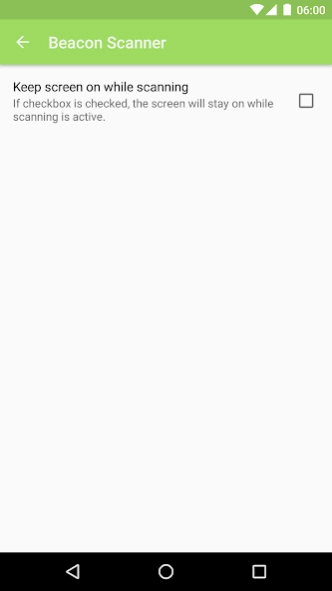
Quickly scan for iBeacon, AltBeacon and Eddystone.
iBeacon, Eddystone and AltBeacon scanner with beautiful material design.
Scans and shows details about every iBeacon, Eddystone (UID, URL, TLM frames) and AltBeacon in your vicinity.
Displays important beacon information like
* UUID, Minor and Major values for iBeacons/Altbeacons.
* URL, UID and TLM frames for Eddystone.
* Proximity value (immediate, near, far)
* Distance to beacon
* TX and RSSI values
* A graph showing the last RSSI values
* Bluetooth information like MAC address and more
* Dump beacon data to local CSV file
* Send beacon data to a web API via POST requests
* Copy and paste single beacon data snippets
This app requires Bluetooth Low Energy (aka Bluetooth 4.0) integrated into your device and at least Android 4.3.
A big thanks goes to Radius Networks for providing great libraries, informations and tools!
iBeacon is a trademark of Apple Inc., registered in the U.S. and other countries.
About iBeacon & Eddystone Scanner
The company that develops iBeacon & Eddystone Scanner is flurp laboratories. The latest version released by its developer is 1.0.1.
To install iBeacon & Eddystone Scanner on your Android device, just click the green Continue To App button above to start the installation process. The app is listed on our website since 2016-04-19 and was downloaded 34 times. We have already checked if the download link is safe, however for your own protection we recommend that you scan the downloaded app with your antivirus. Your antivirus may detect the iBeacon & Eddystone Scanner as malware as malware if the download link to de.flurp.beaconscanner.app is broken.
How to install iBeacon & Eddystone Scanner on your Android device:
- Click on the Continue To App button on our website. This will redirect you to Google Play.
- Once the iBeacon & Eddystone Scanner is shown in the Google Play listing of your Android device, you can start its download and installation. Tap on the Install button located below the search bar and to the right of the app icon.
- A pop-up window with the permissions required by iBeacon & Eddystone Scanner will be shown. Click on Accept to continue the process.
- iBeacon & Eddystone Scanner will be downloaded onto your device, displaying a progress. Once the download completes, the installation will start and you'll get a notification after the installation is finished.
Program Details
System requirements
Download information
Pricing
Version History
version 1.0.1
posted on 2016-04-19
This is a big one, especially for everybody using the logging feature!,- Rewrote logging architecture,- Added ability to send beacon data to a HTTP API via POST requests,- Added a setting to keep the screen on while scanning,- Added ability to clear the scan list (outdated beacons),- Added support for EddyStone TLM frames,- Complete rewrite of the underlying app architecture (Flux, baby!),- Updated all used libraries,Have fun!
